
See AutoLingo translate a post in 90 seconds
A post written in English, published, then translated into French and linked in Polylang.
Up and running in 5 minutes
No coding required. AutoLingo fits entirely into the WordPress admin you already know.
Install & activate
Install AutoLingo from WordPress.org or upload the zip. Activate it and open Settings → AutoLingo.
Choose the translation engine
With Premium, AutoLingo AI translates right away, no API key needed. Or paste your DeepL, Google Cloud, Microsoft, OpenAI or DeepSeek key: AutoLingo detects your plan.
Pick your languages
Select source and target languages — AutoLingo reads your Polylang or WPML config so your language flags stay in sync.
Translate
Publish a post, hit the translate button, or run wp pdat translate-missing. Your multilingual site is live.
Everything you need to go multilingual
AutoLingo handles the entire translation pipeline — from your first publish to bulk CLI migrations.
Auto-translate on publish
Every publish or update creates translations in all your target languages. Toggle per site.
Manual translate button
A one-click translate button in the editor metabox and posts list. Translate any single post on demand.
Bulk translation via WP-CLI
Migrate a whole site in minutes: translate-missing, translate-all, audit and audit-acf. Dry-run included.
Five translation providers
DeepL (best quality), Google Translate (widest coverage), Microsoft Translator (2M free characters a month), OpenAI (most flexible), DeepSeek (most cost-effective). When one runs out of quota, the next takes over. Switch with no code.
DeepL Glossary
Define your key terms once — brand names, industry jargon and phrasing stay consistent across every translation.
Formality control
Pick a formal or informal tone for DeepL (DE, FR, IT, ES, NL, PL, PT, RU, JA) to match your brand voice.
Credit monitoring
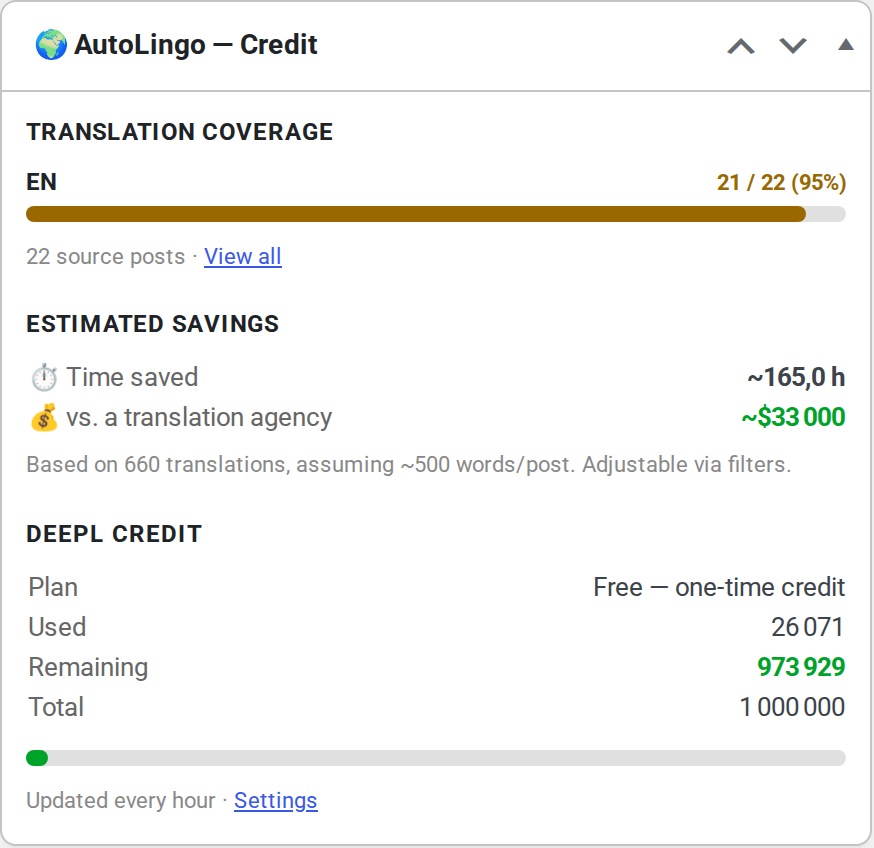
Checks your DeepL balance before each translation and warns you with an admin notice when it runs low.
Retry on rate limit
On HTTP 429 it retries with exponential back-off — 2s, 4s, 8s — up to 3 attempts. Nothing is lost.
Translation log viewer
Every request logged in wp-admin with 30-day retention: source, target, provider, status.
Context-aware translation
Each call tells the provider what it is translating (product page, article, menu…), so short, ambiguous texts come out right.
Image alt text
Image alt and title text inside your content is translated with the rest, in the same call.
Shortcode & SEO protection
Shortcodes and variables like %%title%% are placeholdered before sending and restored verbatim.
No-translate zones
Wrap any passage in [notranslate]…[/notranslate] to have it reproduced verbatim in every language — brand names, codes, quotes.
Background translation
Long posts are translated via WP-Cron so the editor save never blocks. Threshold configurable in Settings → AutoLingo.
No wasted credit
A content hash skips the API entirely when nothing changed since the last translation. Title, content and excerpt are sent in a single batched request.
Page buildersPremium
Elementor, Bricks and Beaver Builder translated field by field — not as a raw JSON blob.
SEO meta translationPremium
Yoast, RankMath, SEOPress and The SEO Framework meta fields translated, variables preserved.
ACF fieldsPremium
Text, textarea, WYSIWYG, link, repeater and flexible content translated recursively.
WooCommercePremium
Product attributes and purchase note translated. Price, stock and SKU never touched.
Right there in your WordPress dashboard
Translation coverage, time and money saved, remaining DeepL credit — all in one place, updated live.
Built for the WordPress ecosystem
Deep integrations — not shallow support.
Page Builders
- Gutenberg (native, free)
- Elementor
- Bricks Builder
- Beaver Builder
- Divi / WPBakery / Flatsome
SEO PluginsPremium
- Yoast SEO
- RankMath
- SEOPress
- The SEO Framework
ACF FieldsPremium
- Text & Textarea
- WYSIWYG (rich text)
- Link (title only)
- Repeater & Flexible Content
WooCommercePremium
- Custom product attributes
- Purchase note
- Price / stock / SKU preserved
Providers
- DeepL Free & Pro (auto-detect)
- Google Translate
- Microsoft Translator
- OpenAI (gpt-4o-mini)
- DeepSeek (deepseek-chat)
- Automatic switch when a quota runs out
Requirements
- WordPress 6.0+
- PHP 8.0+
- Polylang (free or Pro) or WPML
- WP-CLI (for bulk commands)
Start free. Upgrade when you need more.
Gutenberg translation is free forever. Premium unlocks page builders, SEO meta, ACF and WooCommerce.
- ✓Gutenberg — title, blocks, excerpt
- ✓Auto-translate on publish
- ✓Manual translate button (editor + list)
- ✓Bulk WP-CLI: translate-missing, translate-all, audit
- ✓DeepL, Google Translate, Microsoft Translator, OpenAI, DeepSeek
- ✓DeepL credit monitoring & dashboard widget
- ✓Translation log — 30-day retention
- ✓Shortcode & SEO variable protection
- ✓[notranslate] shortcode — verbatim passages in every language
- ✓Background translation via WP-Cron
- ✓Unchanged-content detection — zero wasted credit
Also for or a year, excl. tax.
- ✓Everything in Free, plus:
- ✓AutoLingo AI included — no API key, 1,000,000 characters a month per site
- ✓Elementor, Bricks, Beaver Builder
- ✓SEO meta — Yoast, RankMath, SEOPress, TSF
- ✓ACF — text, WYSIWYG, repeater, flexible
- ✓WooCommerce — attributes & purchase note
- ✓DeepL glossary & formality control
- ✓Priority email support & updates
What each version does
| Free | Premium — $39.99/yr excl. tax, 1 site | |
|---|---|---|
| Providers | DeepL, Google, Microsoft, OpenAI, DeepSeek, with automatic fallback | Same, plus AutoLingo AI with no key (1,000,000 characters a month per site) |
| Content | Gutenberg, Classic Editor, Divi / WPBakery / Flatsome, categories, tags, menus, image alt text | Plus Elementor, Bricks, Beaver Builder |
| SEO meta | ✗ | Yoast, RankMath, SEOPress, The SEO Framework |
| Fields and shop | ✗ | ACF (repeater, flexible content), WooCommerce attributes and purchase note |
| Bulk translation | WP-CLI | WP-CLI |
| Support | WordPress.org forum | Priority email · 14-day money-back guarantee |
Translation is billed by your provider at its public rate. AutoLingo adds no markup. Free DeepL, Google and Microsoft accounts add up to about 3 million characters a month.
AutoLingo vs TranslatePress vs WPML
A quick feature comparison to help you choose the right tool for your workflow.
| AutoLingo | TranslatePress | WPML | |
|---|---|---|---|
| Free plan | ✓ Gutenberg | Limited | ✗ |
| Automatic translation (DeepL / AI) | ✓ | ✓ | ✓ |
| Works with Polylang and WPML | ✓ | ✗ | ✗ |
| WP-CLI bulk translation | ✓ | ✗ | Partial |
| Elementor / Bricks / Beaver | Premium | ✓ | ✓ |
| ACF fields | Premium | ✓ | ✓ |
| Translation log | ✓ | ✗ | Partial |
| Starting price | Free | €99/yr | €39/yr |